Sunday, 5 March 2017

Ad Viewability - Importance over Impressions and other Interesting Factors

What is Viewability in Digital Advertising?

If I have to put this in simplest of the terms, viewability is an online marketing metric that tracks only those impressions that can actually be seen by the users.

How to measure Display Ad Viewability?

A display ad is considered viewable when 50% of an ad's pixels are visible on a screen for a minimum of one second.

measuring ad viewability - display ads and video ads
Source: viewability.withgoogle.com

How to measure Video Ad Viewability?

A video ad is considered viewabale when atleast 50% of the ad's pixels are visible on a screen for atleast two consecutive seconds.

Why is Ad Viewability more important than Impressions?

An ad might be served but not necessarily viewed by the user. Only a viewable ad can have an impact on user's mind, change perceptions or build a brand's trust. Hence digital advertisers and publishers are both giving more importance to a viewable ad rather than a served impression.

What are some important factors related to Display and Video Viewability?

To better understand the state of display and video viewability, Google conducted a study of their display and video advertising platforms such as Doubleclick, Youtube, etc.

They have beautifully presented five top factors related to Display and Video viewability here:

I have tried to list down some of the interesting factors here:

Display Ad viewability:
  • The most viewable position is right above the fold and not at the top of the page
display ad viewability above the fold
Source: www.thinkwithgoogle.com
  • Vertical ad units perform better than the horizontal ad units in terms of viewability. This is simply because the vertical ads stay on screen longer with the users movement around the page
  • Average above the fold viewability is 68% compared to 40% below the fold
  • The most popular viewability rates by ad sizes are mentioned below:
viewability rates by display ad sizes
Source: www.thinkwithgoogle.com

 Video Ad viewability:
  • Average viewability of video ads across the web (excluding Youtube) is 54%. It goes upto 91% for Youtube
average video ad viewability
Source: think.storage.googleapis.com
  • Video ads are more viewable on mobile and tablet devices than on desktop
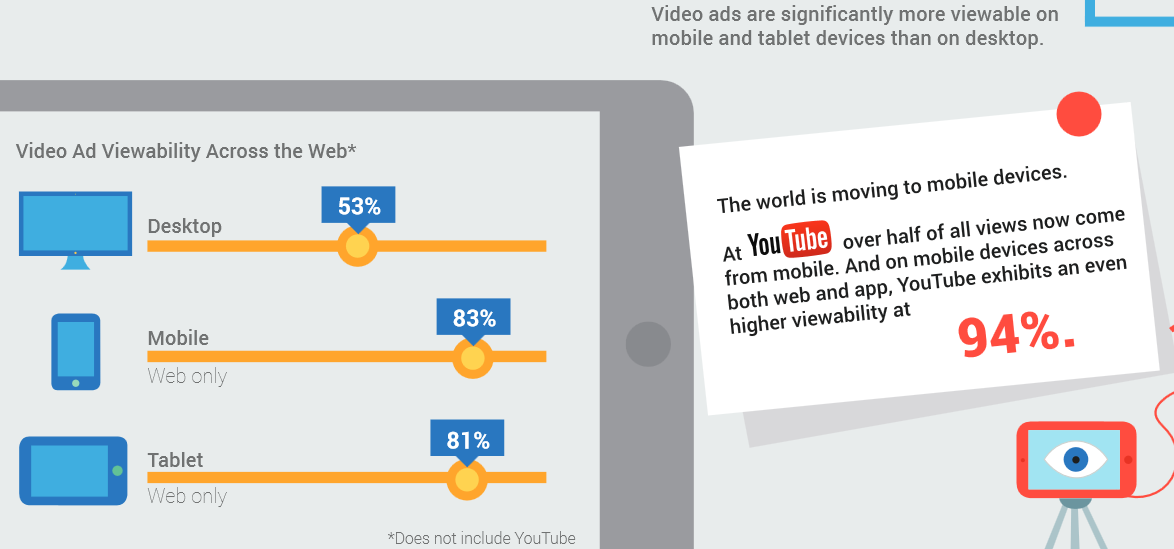
Video ad viewability based on devices
Source: think.storage.googleapis.com
  • There are several video ads that are not viewable. 76% of those were never on screen - they were on a background tab or not on the screen at all! 24% of the non-viewable ads were scrolled off the screen or abandoned in fewer than two seconds
  • 350 X 250 video ad size is most popular by volume but offers only 20% viewability. 848 X 477 is the second most popular size and it offers a huge improvement of 89% viewability 
Video ad viewability based on video player sizes
Source: think.storage.googleapis.com

An important note for the Adsense Publishers:

Adsense publishers can make use of above mentioned factors to improve the ad viewability on their sites. Just make a note of one thing. When we talk about first fold of the page that provides more ad viewability, ads placed just above the fold of a page have higher viewability that those at the top of the page. But you need to follow the Adsense ad placement policies also. You can't place a 300 X 250 ad unit above the fold on mobile pages. So go for 320 X 100 ad units above the fold for mobile pages. You can place larger ad sizes below the fold.

- Tejas Thakkar 

Wednesday, 1 March 2017

Mobile Page Speed - Importance & New Industry Benchmarks

Why should you care about Mobile Page Speed?

If you are wondering how to impress the Google crawlers, first think of the user experience on your site. One of the most important factors for a better user experience is your page speed. With more than half of the searches now on mobile devices, it is imperative to work on your mobile page speeds.

An old yet very informative post on Kissmetrics stated the following:
  • 40% users abandon a site that takes more than three seconds to load
  • A one second delay in page response time can reduce your conversions by 7%
  • If a site makes $100,000 every day, one second delay in your page load time can potentially cost $2.5 million loss in sales every year
There are several useful articles on 'think with Google' that helps us understanding the importance of Mobile Page Speed and how to create a better mobile user experience.

While users expect sites to deliver fast and frictionless mobile experiences, the reality is that most of the mobile sites don't live up to the expectations. We put most of our efforts to manage key engagement metrics (bounce rate, average time spent on the site, etc), we often ignore the mobile experience. Not to forget, searches on mobile devices have toppled desktop searches. If not now, then never! It's high time we start concentrating equally on improving the mobile site experience.

One of the earlier researches from Google in 2016 stated the following facts. Although the research could be limited to US audiences, these facts are good enough for us to believe that mobile is future:-
  • 30% of all the online shopping purchases happen on mobile devices
  • 40% users leave a page that takes more than three seconds to load
  • 79% shoppers who are dissatisfied with a site's performance say they are less likely to purchase from the same site again
According to a recent post from Google:
  • 53% users leave a page that takes more than three seconds to load - implies the dissatisfaction level has increased from 40% to 53%
  • Even though mobile searches have toppled the desktop searches, mobile conversion rates are lower than desktop - reasons could be, users still prefer to purchase on desktop and it can also be due to the slow loading mobile pages. Speed equals revenue!
  • 70% of the pages analysed by Google, the visual content above the fold took almost seven seconds to load. And it took around 10 seconds to load the full visual on the page - implies most of the mobile pages are full of unwanted elements that take ages to load.
What are the new Industry Benchmarks for Mobile Page Speed?

industry benchmarks for mobile page speed

Google's research had many other important findings:
  • 70% of the mobile pages were over 1MB in size
  • 36% were over 2MB
  • 12% were over 4MB
One should note that 1.49MB takes around seven seconds to load using a fast 3G connection. So it's pretty clear how important it is for you to have fast loading mobile pages!

Here is a link that can guide you on how to improve your mobile page speed:

With Google's mobile-first index in the reckoning, it's a must that you start optimising your sites for a better mobile user experience. A stitch in time saves nine!

- Tejas Thakkar

Tuesday, 21 February 2017

Google's List Carousel is so Interesting!

Google constantly keeps modifying it's search layout to provide more and more useful features to the searchers. In a recent advancement, Google has started testing list carousels at the top. I have tried to list down some variations here found on Google.co.in:-

Query - Top Actors


Query - Top Cricketers


John Mueller from Google had earlier explained that they rank such lists using an algorithm which is different from the main algorithm. (Twitter discussion).


Couple of interesting observations that I would love to share here:-

In a recent Tweet, we found similar featured snippet but with a breadcrumb at the top. 


In the first image you would see list of SEO blogs but with a breadcrumb at the top. If you click on 'Blogs', you would find a listing as shown below:


One can see a longer breadcrumb as seen in the following example:-


And this one is my favourite!

For the query "Popular Places in India", you would see a huge listing of popular destinations in India. Interestingly, you would also see a drop-down to categorize the destinations:


Now if you select an item of your choice from the drop-down, it will suggest you related destinations. I select 'Wildlife':-


Isn't that beautiful?

Now why would someone leave Google and visit a site from their search results? You are getting most of your queries answered on Google's search results page through knowledge graphs, featured snippets, answer boxes and what not! 

Another CTR concerns for the top three ranking sites in organic listings for such queries? I should say, unfortunately Yes!

- Tejas Thakkar

Saturday, 18 February 2017

What happens when your Robots.txt file returns a Server Error?

What is robots.txt?

Robots.txt file is a standard used by websites to specify web crawlers which areas of the site should not be crawled. Here are basic examples of a robots.txt setups:-

If you want to allow full access to your site:

User-agent: *
Disallow:

If you want to block access to your whole site:

User-agent: *
Disallow: /

If you want to block a folder:

User-agent: *
Disallow: /folder/
You have to add robots.txt file to the root folder of your domain:
www.example.com/robots.txt

Since this is a file that contains important instructions for the web crawlers, it is a must for the crawlers to first visit this page and then rest of the site.

Do make a note of this - If Google bots can't crawl your robots.txt file, it would not crawl your site. If your robots.txt file doesn't return a 200 or 404 response code, Google bots won't be able to crawl your robots.txt file and hence they won't crawl your site.

This is what Google's Eric Kuan once said on Google Webmaster Help forum:

If Google is having trouble crawling your robots.txt file, it will stop crawling the rest of your site to prevent it from crawling pages that have been blocked by the robots.txt file. If this isn't happening frequently, then it's probably a one off issue you won't need to worry about. If it's happening frequently or if you're worried, you should consider contacting your hosting or service provider to see if they encountered any issues on the date that you saw the crawl error.

Even Gary Illyes from Google recently confirmed the same on Twitter:
And here are few interesting questions on Twitter and helpful replies from Gary:   

Gary Illyes on robots.txt
- Tejas Thakkar

Tuesday, 7 February 2017

Mobile Pages replaced by Desktop Pages on Mobile Search - Something unusual this time!

Since the start of February 2017, we have observed something unusual. Some of the sites that have separate mobile version are seeing their mobile pages being replaced by desktop pages on Google Mobile search.

This used to be a case earlier but not with such a big volume. I have faced few instances in the past where dedicated mobile version is perfectly set up with every thing in place, still we see desktop pages rank in mobile search instead of the mobile pages.
The most probable reason for that was something already clarified by Google in 2015.

Google does not rank mobile content based on what is on the page served for mobile users, as the page is still ranked according to the content on the desktop page.

The scenario will be the other way round when Mobile First Index is rolled out.

Currently they actually run comparison checks on sites, comparing desktop versus mobile, to ensure that the content “matches up” when the site is using rel=canonical.

There is a possibility that many a times, Google finds the desktop page more valuable than the mobile version and hence ranks desktop page on mobile search.

But the scenario this month is a bit unusual.

Here are few examples from Google.co.in mobile search:-

Mobile Search Results for 'Mobile Price'
Mobile Search Results for 'Dominos Pizza Offers

Mobile Search Results for 'Online Shopping'
The above three screenshots were taken on 6th Feb 2017. 

In the first screenshot, MySmartPrice and CompareRaja have separate mobile sites. Usually they rank in mobile search results. But for some weird reasons, we can see the desktop versions ranking on mobile search.

Similarly sites like GrabOn, Couponraja, Jabong and Shopclues also rank for their desktop versions instead of mobile pages as shown in the other two screenshots above.

This issue was raised by certain experts on Twitter. Here is one of the Twitter conversations:


And here is another conversation on Twitter:


Here are the links for related Twitter conversations:

Neither Gary Illyes nor John Mueller has confirmed anything on this. Let's wait for their response.

I also checked Google Search Console account for one of the sites that came across this issue.

The impressions and clicks have gone up for the desktop version from 1st Feb 2017 and almost an equivalent drop is observed for the mobile version.

Increase in Impressions and Clicks for Desktop version
Decrease in Impressions and Clicks for Mobile version
Interesting. Let's see if this is an algorithmic experiment or merely a glitch. Please share your thoughts if you have seen a similar trend for your sites.

- Tejas Thakkar

Tuesday, 31 January 2017

SEO in Short - Recap for January 2017

Here is a list of top 5 posts from SEO in Short


Crawl Budget is a good old concept often overlooked by the search engine optimization experts. While we all keep pondering on how good the title tags need to be or how to optimize the images; we often forget about how easy or difficult the crawler journey would be on our site?


Read here to know more about Crawl Budget and ways to optimize it…


Google has already rolled its new policy to devalue pages that use intrusive interstitials and popups. I have tried to list down some important factors that we need to know about this new policy.


Read here to know more about this…


Check the impact of Google’s Pop-up penalty on sites so far. And what does Google representatives have to say about it. Read here…


AMP is a highly trending concept in the SEO world. Webmasters are wondering whether to implement AMP or not? Is it a ranking factor?


Get your answers here…


Ad balance is a feature introduced to give more controls to publishers to provide better ads experience to site visitors.


Read here to know more about this new feature…


Tejas Thakkar

Thursday, 26 January 2017

Is AMP a Ranking Factor? Should I Implement AMP?

AMP is a highly trending concept in the SEO world. Webmasters are wondering whether to implement AMP or not? Is it a ranking factor?

To be honest AMP is still in its infant stage. If AMP is here to stay, we are bound to see a lot more updates related to it. There are several sites that have already implemented AMP. Some have implemented across the whole site while some have done it just for few static pages.

I tried making a Google search on mobile for 'mobile price online'. Here is the result:-


Snapdeal.com ranks for its AMP version.

Similarly when I made a mobile search for 'cricket', the top stories were full of AMP pages:-


For those who are still new to the AMP concept:-

What is AMP?

AMP means Accelerated Mobile Pages. AMP is a stripped down form of HTML that is designed to make fast mobile pages. 

Google believes a page created with AMP HTML should load 15 to 85% faster than the non-AMP version of that page. This is possibly because the reimagined version of HTML, i.e. AMP HTML cuts down elements like JavaScript and third-party scripts that cause pages to load slower on mobiles.

Is AMP a ranking factor?

Google's representatives have repeatedly said that AMP isn't a ranking factor. While few of the SEO experts have twitted at times about ranking improvement for AMP pages, there hasn't been a strong case so far.

Recently John Mueller confirmed on Twitter, AMP isn't a ranking factor:

Should I implement AMP?

As I said before, AMP as a concept is still in its infant stage. But then there is no harm in trying it out - only if you implement it correctly with all the AMP related tags in place.

To begin with you can implement AMP on your top 10 to 20 important pages that majorly serve static content. Or why not try it on your blog?


Above all, its all about serving fast loading mobile pages to the users. Why not also try making your existing mobile pages load faster? Even that is a good idea, isn't it?

This isn't a pleasant site for any of us:-


Tejas Thakkar